
Lead capture pages are standalone web pages designed to collect visitor information in exchange for something valuable, converting anonymous traffic into identified leads. When built correctly, they serve as conversion engines that feed your sales pipeline with prospects who have actively raised their hand and expressed interest in your solution.
Most B2B companies waste thousands on ads that drive traffic to generic homepages, watching 98% of visitors leave without a trace. Lead capture pages fix this by creating a focused, single-purpose experience that asks for one decision: trade contact information for something worth having. For B2B SaaS and service teams, this means the difference between burning ad spend and filling calendars with qualified demos.
What Makes Lead Capture Pages Different From Regular Landing Pages?
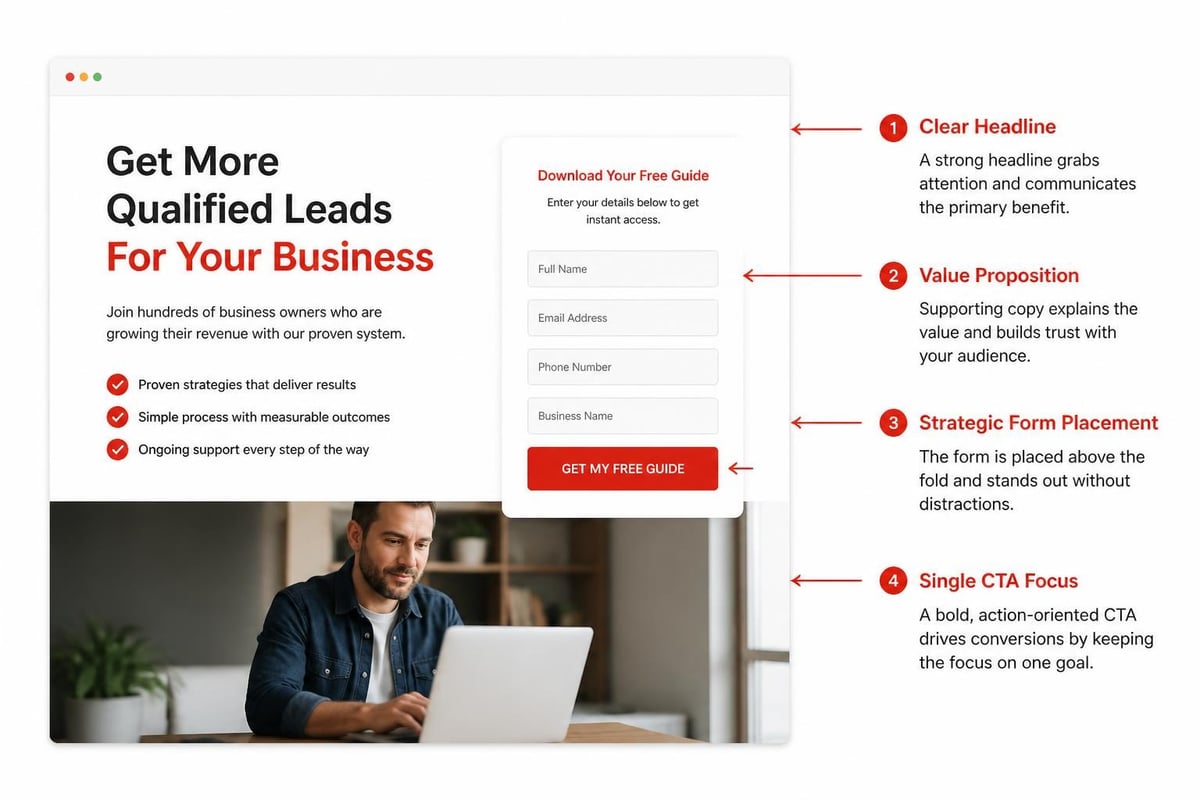
Lead capture pages have one job: get the form submission. Regular landing pages might educate, build brand awareness, or guide visitors through multiple paths. A lead capture page eliminates every distraction and optimizes every element around a single conversion goal.
The difference shows up in design decisions. Navigation menus disappear. Multiple CTAs get replaced with one clear offer. Copy focuses exclusively on the value exchange, not company history or feature lists. According to HubSpot’s landing page research, pages with a single call-to-action see conversion rates 13.5% higher than those with multiple offers competing for attention.
Key structural differences include:
- No navigation header or footer links
- Single, prominent form above the fold
- Copy focused entirely on the offer's value
- One CTA repeated strategically, not multiple choices
- Mobile-first responsive design that prioritizes the form
The Psychology Behind Effective Lead Capture
People don't fill out forms because they love giving away their email address. They do it when the perceived value of what they'll receive exceeds the friction of providing information. This value-friction balance determines your conversion rate more than any other factor.
Friction comes from field count, form complexity, trust concerns, and unclear value. A seven-field form asking for company revenue and phone number before explaining what the prospect gets creates massive friction. A two-field form (name and email) offering an immediately useful resource reduces friction to near zero.
Aletto sees this daily in B2B lead generation campaigns. Forms requesting only essential information convert 40-60% better than those asking for full qualification data upfront. Save detailed qualification for AI follow-up conversations, not the initial capture moment.
What Should Your Lead Capture Page Offer Include?
Your offer determines whether visitors convert. No amount of design polish saves a weak offer. B2B buyers in 2026 ignore generic ebooks and "ultimate guides" because they've downloaded hundreds without finding value.
Offers that actually drive conversions:
- ROI calculators customized to their input
- Live benchmark data comparing their metrics to peers
- Implementation templates they can use immediately
- Recorded training or certification programs
- Free trial access to proprietary tools
- Assessment reports analyzing their specific situation
Generic content loses to specific, actionable resources every time. A "SaaS Marketing Guide" gets ignored. "The Exact Paid Ad System That Booked 1,122 Qualified Calls in 11 Months" gets clicked. Specificity signals value.
When prospects see numbers, timelines, and concrete outcomes in your offer description, they believe you've actually done the work. Vague promises about "boosting leads" or "improving conversion" sound like every other piece of content marketing. Name the result, show the proof, deliver the system.
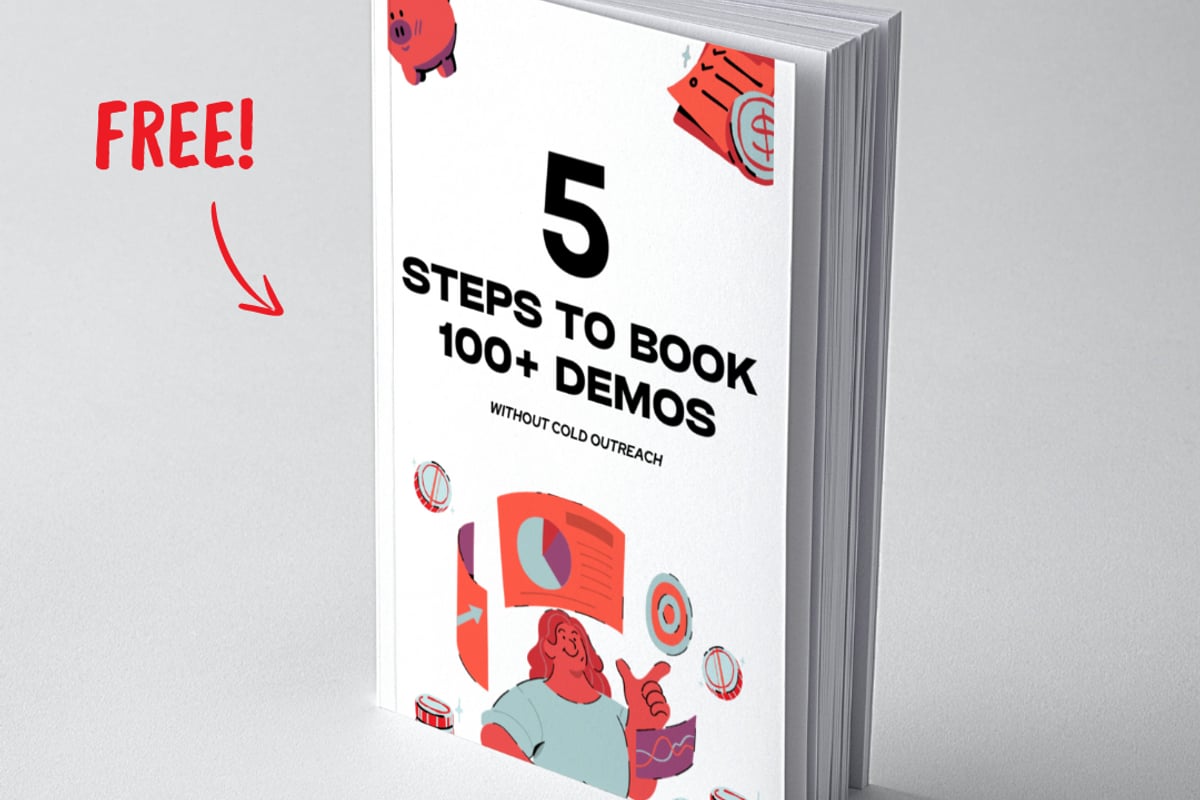
For B2B sales teams struggling to fill their calendars with qualified demos, sharing exactly how you've solved that problem carries more weight than any thought leadership whitepaper. That's why Aletto's approach to tools for lead generation focuses on demonstrating systems that produce measurable calendar fills, not theory.
How Do You Design a Lead Capture Page That Converts?
Design either supports or sabotages conversion. Every visual element should guide the eye toward the form and reinforce the value proposition. Anything else is decoration that costs conversions.
Start with the headline. You have three seconds to communicate value before visitors bounce. Your headline must answer: "What do I get, and why should I care?" Not your company story. Not industry trends. The specific benefit they receive for submitting the form.
| Element | Purpose | Best Practice |
|---|---|---|
| Headline | Hook attention, state benefit | 6-12 words, outcome-focused |
| Subheadline | Expand on value, add specificity | 15-25 words, include numbers |
| Hero image | Visualize the offer or outcome | Authentic screenshots, data, or process |
| Form | Capture information | 2-4 fields maximum for top-funnel |
| CTA button | Trigger submission | Action verb + benefit, contrasting color |
| Trust signals | Reduce friction | Logos, testimonials, security badges |
The form itself deserves obsessive attention. Every additional field you add drops conversion rates by an average of 11%, according to conversion research. Ask only what you absolutely need. Accessible form design matters for both compliance and conversion since clear labels and logical flow reduce user confusion.
Form Field Strategy for B2B Lead Capture
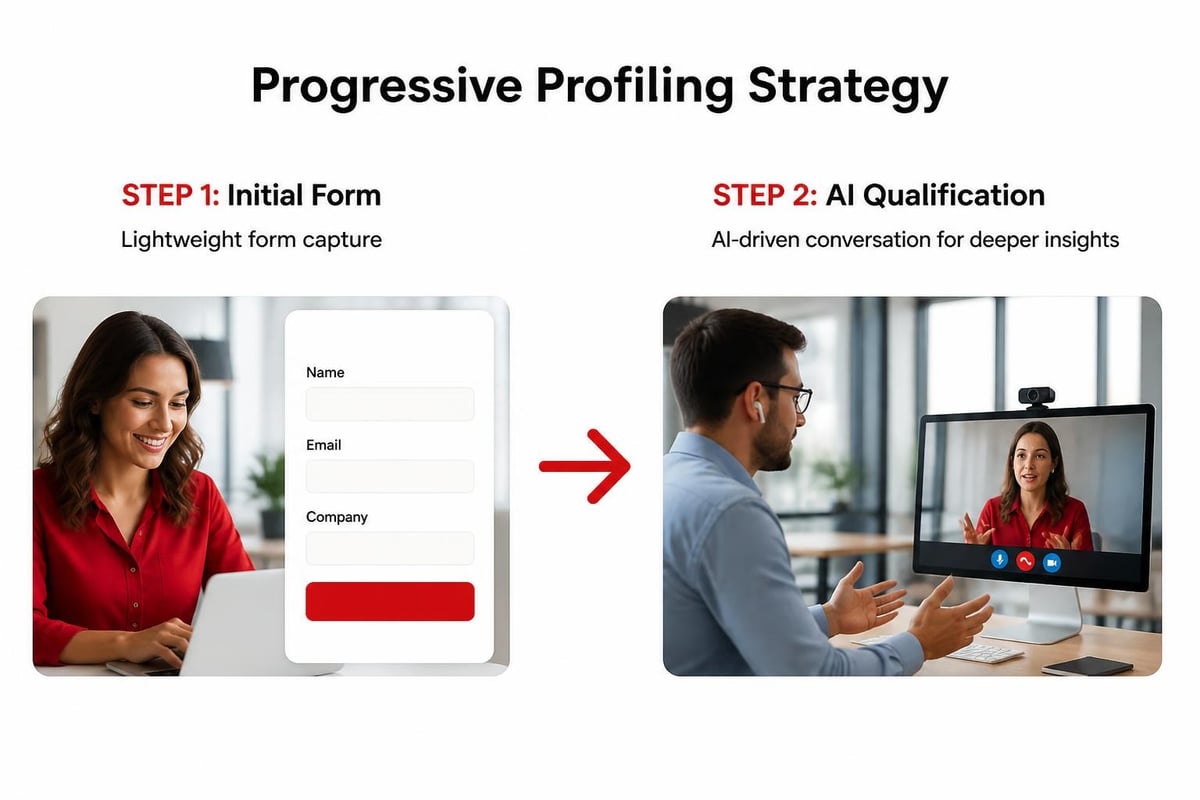
B2B marketers face a dilemma: sales teams want qualified leads with company size, role, and budget information, but adding fields kills conversion rates. The solution is progressive profiling and smart defaults.
Capture name and email first. Use AI follow-up to qualify further through conversational exchanges that feel helpful, not interrogative. This approach consistently outperforms long forms trying to qualify before the relationship begins.
Button copy matters more than most teams realize. "Submit" converts poorly because it describes the action, not the benefit. "Get My Free Report" or "Show Me the System" converts better because it reinforces value. Test variations, but always frame the button text around what they receive, not what they give.
Consider the scenario: A VP of Sales at a 50-person B2B SaaS company lands on your lead capture page after clicking a LinkedIn ad. They're evaluating whether your offer merits sharing their contact info. A clean page with "Get the Exact Call-Booking System Used by 200+ SaaS Teams" as a headline, three fields (name, email, company), and social proof from similar companies will outperform a cluttered design asking for ten data points.
What Role Does Copy Play in Lead Capture Page Performance?
Copy is the difference between "another form on the internet" and "I need this now." Most lead capture pages fail because the copy focuses on the creator, not the visitor. Every sentence should answer the visitor's internal question: "What's in this for me?"
Open with the outcome. "Book 10 More Qualified Demos Next Month" beats "Our Comprehensive Lead Generation Guide" because one promises a result and the other promises homework. B2B buyers have limited time and unlimited content options. Make the value immediate and specific.
Copywriting framework for high-converting pages:
- Headline: State the specific outcome or transformation
- Subheadline: Add credibility through numbers, timeline, or social proof
- 3-5 bullet points: List exactly what's included or what they'll learn
- Trust element: Show who else has used this successfully
- Risk reversal: Clarify it's free, no credit card, or instant access
- CTA: Repeat the benefit in action-oriented language
Avoid industry jargon unless your audience specifically searches for it. "Improve your lead acquisition funnel" means nothing to someone who doesn't think in those terms. "Get 20 more sales calls per month" speaks plainly to the actual goal.
The best copy sounds like a helpful colleague sharing what worked, not a marketing team trying to position a brand. When generating qualified sales calls, straightforward language about calendar fills and conversion rates beats thought leadership positioning every time.
How Should You Test and Optimize Lead Capture Pages?
Most companies build a lead capture page, launch it, and never touch it again. That's leaving money on the table. Systematic testing finds conversion rate improvements of 50-200% hidden in small changes to headlines, form fields, and trust signals.
Start with high-impact elements. Headline variations can swing conversion rates 20-40%. Test different value propositions: outcome-based vs. curiosity-driven, specific numbers vs. general benefits, question format vs. statement format.
Form length testing reveals your audience's friction threshold. Test a two-field version against a four-field version. Many B2B companies assume they need company size and role upfront, then discover the two-field version converts 60% better and AI follow-up captures qualification data anyway.
A/B testing guidance from Optimizely covers hundreds of testable elements, but prioritize these five first:
- Headline and value proposition variations
- Form field count and labels
- CTA button copy and color
- Trust signal placement and type
- Page length and information density
Run tests until you reach statistical significance. Too many marketers call tests early, choosing a winner after 100 conversions when random variance still dominates. Use a sample size calculator and wait for 95% confidence before implementing changes.
Mobile Optimization Is Non-Negotiable
Sixty-three percent of B2B research happens on mobile devices, yet most lead capture pages still prioritize desktop design. Mobile-first design means forms that work perfectly on a 375px screen, not desktop forms crammed onto small viewports.
Mobile optimization requirements include:
- Single-column layouts that eliminate horizontal scrolling
- Large, thumb-friendly form fields and buttons (minimum 44x44px)
- Streamlined copy that gets to the value proposition in two sentences
- Fast load times under 2 seconds (see Core Web Vitals)
- Click-to-call buttons for immediate engagement options
Test your page on actual devices, not just browser simulators. Fill out the form yourself on a phone while standing in line at coffee shop with spotty WiFi. If anything frustrates you, fix it.
Page speed directly impacts conversion rates. A lead capture page that takes five seconds to load on mobile loses half its potential conversions before anyone even sees the form. Optimize images, minimize JavaScript, and use lazy loading strategically.
How Do Lead Capture Pages Fit Into a Complete B2B Funnel?
Lead capture pages work as part of a system, not as standalone conversion tools. The complete funnel includes paid acquisition driving targeted traffic, the lead capture page converting visitors, AI follow-up qualifying and nurturing, and automated booking scheduling qualified demos.
This integrated approach means your lead capture page needs to connect seamlessly to what happens next. The instant someone submits their information, they should receive the promised asset while simultaneously entering a qualification sequence that feels helpful, not pushy.
Aletto's system demonstrates this integration in action. Paid ads target specific buyer personas with precise messaging, driving them to dedicated lead capture pages designed around their specific pain points. Upon form submission, prospects instantly receive the promised resource while AI follow-up begins conversational qualification that routes qualified prospects directly to booking calendars.
The handoff quality matters as much as the initial conversion. A lead capture page converting at 45% means nothing if your follow-up system loses 80% of those leads to poor nurture sequences. Capture and conversion form two parts of one system.
| Funnel Stage | Key Metric | Industry Benchmark | Optimization Focus |
|---|---|---|---|
| Ad to Page | Click-through rate | 2-5% | Message match, targeting |
| Page to Form | Conversion rate | 15-40% | Offer strength, design, copy |
| Form to Qualified | Qualification rate | 30-50% | Follow-up quality, speed |
| Qualified to Booked | Booking rate | 40-60% | Scheduling friction, urgency |
Tracking the complete funnel reveals where conversion breaks down. Most B2B companies obsess over landing page conversion rates while ignoring that 70% of their leads never get followed up properly. Fix the bottleneck, not just the most visible metric.
What Trust Signals Should You Include on Lead Capture Pages?
Trust determines whether borderline visitors convert or bounce. Unknown brands need stronger trust signals than recognized names. B2B buyers evaluating a lead capture page from a company they've never heard of need proof this isn't a spam trap.
Effective trust signals for B2B lead capture pages:
- Customer logos from recognizable companies in their industry
- Specific testimonials citing measurable outcomes
- Third-party certifications or security badges
- Real photos of team members, not stock imagery
- Privacy policy links and GDPR compliance language
- Concrete usage statistics (number of customers, calls booked, results generated)
Generic trust signals fail. "Trusted by thousands of companies" means nothing. "Used by 247 B2B SaaS companies including [recognizable names]" provides specific, verifiable social proof.
Video testimonials outperform text when they include specific results. A 45-second clip of a customer explaining how they booked 30 qualified demos using your system carries more weight than any amount of your own copy claiming the same outcome.
Security and privacy concerns grow every year. Clearly stating how you'll use submitted information and providing an easy opt-out reduces form abandonment. Accessible form practices that properly label required fields and provide clear error messages also build trust through professional execution.
How Often Should You Create New Lead Capture Pages?
The best lead capture strategies use multiple pages targeting different segments, pain points, and offers. One generic lead capture page trying to serve every audience converts poorly compared to dedicated pages speaking directly to specific buyer personas.
Create separate pages for:
- Different buyer roles (VP Sales vs. Marketing Director vs. CEO)
- Distinct pain points (calendar-filling vs. lead quality vs. sales team productivity)
- Various traffic sources (LinkedIn ads vs. Google search vs. email campaigns)
- Multiple offers (reports vs. tools vs. assessments)
Message match between ad and page drives conversion rates higher than nearly any on-page optimization. Someone clicking an ad about "booking more qualified B2B demos" who lands on a generic lead generation page experiences disconnect. They should land on a page with a headline mirroring the ad copy, reinforcing they're in the right place.
This doesn't mean building 50 unique pages from scratch. Template the structure and design, then customize headlines, copy, and offers for each segment. Unbounce’s optimization checklist provides practical guidance for scaling landing page creation while maintaining quality.
Testing frequency depends on traffic volume. Pages receiving 500+ visitors per month can support continuous testing. Lower-traffic pages need either longer test durations or should focus on larger, higher-impact variations rather than incremental tweaks.
Frequently Asked Questions
What conversion rate should I expect from a lead capture page?
B2B lead capture pages typically convert between 15-40%, depending on traffic source, offer strength, and audience qualification. Cold traffic from broad targeting converts at the lower end (10-20%), while retargeted visitors or search traffic with strong intent converts higher (30-50%). Pages offering highly specific, immediately valuable resources to well-qualified traffic can exceed 50% conversion. Focus on improving your rate quarter over quarter rather than hitting arbitrary benchmarks, since your specific market and offer create unique baselines.
How many form fields should I include on a lead capture page?
Use 2-3 fields for top-of-funnel lead capture: name, email, and optionally company name. Every additional field reduces conversion rates by approximately 11%. Sales teams often request more qualification data upfront, but capturing fewer fields and using AI follow-up to gather additional information yields better overall pipeline results. For high-value offers or bottom-funnel captures where visitors are already highly qualified, 4-5 fields can work if the value justifies the friction. Test your specific audience's tolerance.
Should lead capture pages have navigation menus or links to other pages?
Remove navigation entirely from lead capture pages. Every exit path you provide reduces conversion rates because it offers an alternative to form submission. Studies show conversion rates drop 20-30% when navigation menus remain present. Your goal is focus: one offer, one decision, one action. If visitors want to learn more about your company, they'll search for you. The lead capture page exists solely to convert traffic you've paid to acquire.
How long should my lead capture page be?
Page length should match your offer's complexity and visitor's awareness level. Simple, well-known offers (free trial, newsletter signup) convert best on short pages with minimal copy. Complex B2B offers requiring explanation or trust-building need longer pages that answer objections and demonstrate value. Test both, but prioritize information density over arbitrary length. Every element should serve conversion; remove anything that doesn't.
What's the difference between lead capture pages and squeeze pages?
Lead capture pages and squeeze pages both collect visitor information, but squeeze pages typically offer ongoing value (newsletters, content series) while lead capture pages exchange contact information for a specific one-time asset (report, tool access, consultation). The distinction matters less than execution: clear value proposition, minimal friction, and strong follow-up determine success regardless of terminology. Focus on what you're offering and why it's worth the visitor's contact information.
Lead capture pages convert anonymous website traffic into identified prospects when you nail the value exchange, eliminate friction, and integrate them into a complete follow-up system. The difference between wasted ad spend and a filled sales calendar often comes down to these conversion fundamentals executed consistently.
If you're running paid traffic but watching most visitors disappear without a trace, start by examining what happens the moment they land on your page. Aletto has refined a complete system that integrates high-converting lead capture pages with AI follow-up and automated booking to fill B2B sales calendars with qualified demos. See exactly how this system booked 1,122 qualified calls in 11 months in our free report, showing you the complete framework without requiring cold outreach, events, or burning cash on ineffective tactics.