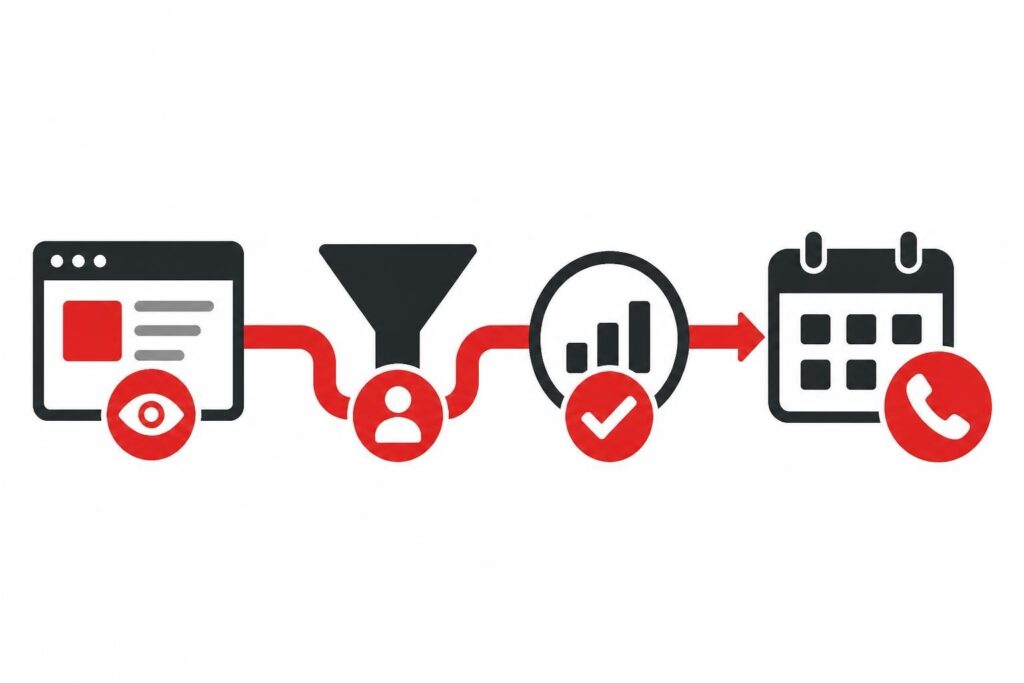
Tracking leads means systematically capturing, monitoring, and analyzing every interaction a prospect has with your business from first touch to closed deal. Without visibility into where leads come from, how they behave, and which actions drive conversions, B2B teams waste budget on channels that don't perform and lose qualified prospects to broken follow-up processes.
The average B2B company loses 79% of marketing leads due to poor tracking and nurture, according to MarketingSherpa research. That means most teams are operating blind, making decisions based on gut feel rather than data. For B2B SaaS and service companies in 2026, effective lead tracking isn't optional-it's the difference between predictable revenue growth and expensive guesswork.
Why Is Tracking Leads Critical for B2B Revenue?
Lead tracking creates accountability across your entire revenue engine. When you know which paid channels, content pieces, and messaging variants generate qualified pipeline, you can double down on what works and cut what doesn't.
Revenue attribution becomes possible only when you track leads properly. You need to know whether that $50,000 deal came from a LinkedIn ad, organic search, a referral, or some combination of touchpoints. Without this visibility, marketing budgets become political rather than data-driven.
The operational benefits compound over time:
- Shorter sales cycles because reps can see a prospect's entire journey and tailor conversations accordingly
- Higher close rates when follow-up is triggered by behavior rather than arbitrary timelines
- Better forecasting because pipeline quality metrics reveal which leads will actually convert
- Lower acquisition costs by identifying and scaling the most efficient channels
Most importantly, tracking leads prevents revenue leakage. When prospects raise their hand but fall through cracks in your process, you've paid for attention you never monetized. A systematic tracking framework ensures every lead gets routed, contacted, and nurtured appropriately.
What Data Points Should You Track for Each Lead?
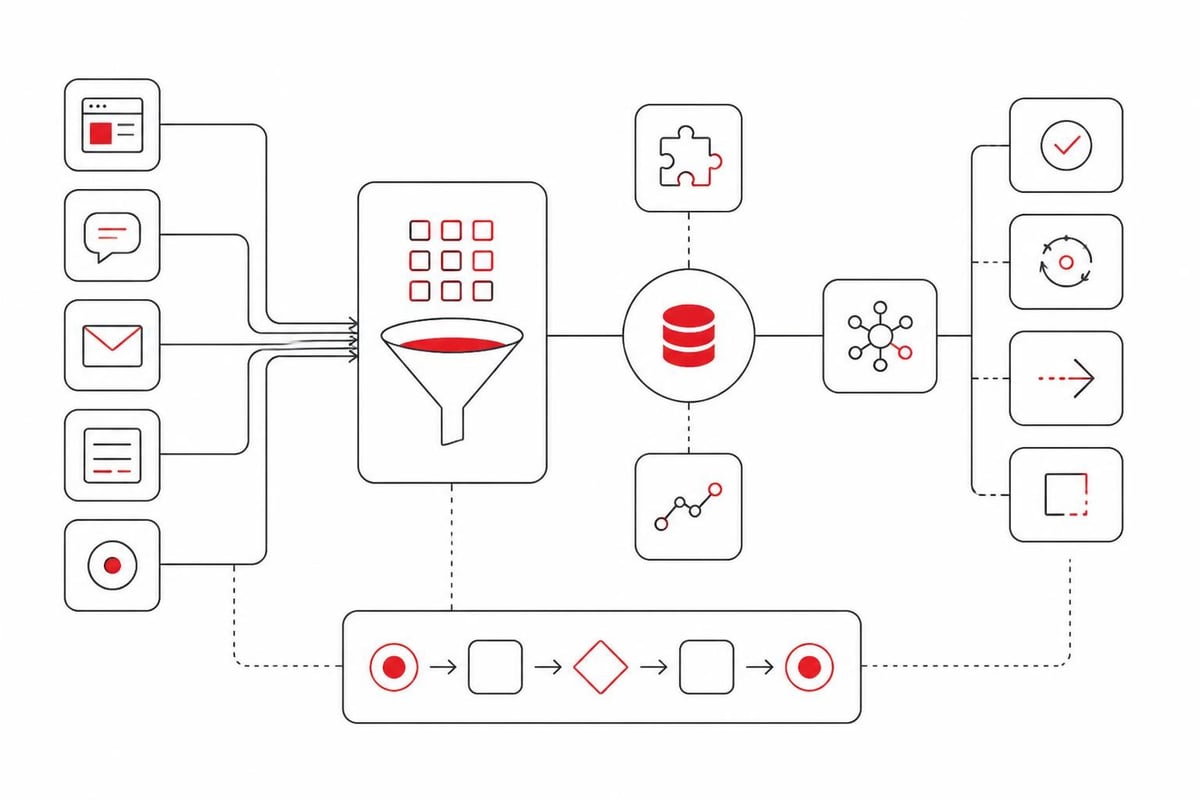
The foundational data set for any lead includes source attribution, behavioral signals, firmographic details, and engagement history. These categories tell you where the lead came from, what they care about, whether they fit your ideal customer profile, and how warm they are.
Source and Campaign Attribution
Track the specific origin of every lead down to the campaign and creative level. This means capturing:
- UTM parameters from all paid and organic traffic sources
- Referral sources including partner links, affiliate codes, and direct referrals
- Content asset that converted the visitor (which ebook, webinar, demo page, etc.)
- Device and location data for understanding context
Implementing event tracking in Google Analytics 4 ensures you capture form submissions, video views, and other conversion events that signal buying intent. Many B2B teams lose attribution because they only track the final conversion, not the entire journey.
Behavioral and Intent Signals
Modern lead tracking goes beyond demographics to capture how prospects interact with your brand. High-value signals include:
- Pages visited and time on site
- Content downloads and resource consumption
- Email open and click patterns
- Return visit frequency
- Feature or pricing page engagement
According to Zapier’s lead management automation guide, companies that trigger follow-up based on behavioral thresholds see 3x higher conversion rates than those using static lead scoring. The key is automating data capture so sales teams see this context without manual research.
Firmographic and Qualification Data
For B2B lead tracking, company-level data often matters more than individual contact details:
| Data Category | Key Fields | Why It Matters |
|---|---|---|
| Company size | Employee count, revenue band | Determines fit for your solution and deal size potential |
| Industry/vertical | Primary NAICS or SIC code | Allows segmentation by use case and pain points |
| Technology stack | Current tools and platforms | Reveals compatibility and replacement opportunities |
| Growth signals | Hiring trends, funding events | Indicates budget availability and expansion needs |
Enrichment tools can append much of this data automatically, but the critical requirement is storing it in a format your CRM and automation platforms can query and segment on.
How Do You Set Up a Lead Tracking System That Actually Works?
Start with clear stage definitions and a single source of truth. Most tracking systems fail because different tools define "lead" differently, creating data conflicts and duplicate records.
Define Your Lead Lifecycle Stages
Establish objective criteria for each stage a lead can occupy. A typical B2B framework includes:
- Visitor: Anonymous traffic, no identifying information captured
- Lead: Contact information collected but not yet qualified
- Marketing Qualified Lead (MQL): Meets basic fit criteria and shows engagement signals
- Sales Qualified Lead (SQL): Confirmed budget, authority, need, and timeline
- Opportunity: Active deal in pipeline with defined value and close date
- Customer: Closed-won and onboarded
The specific stages matter less than having clear, measurable entry criteria. For example, an MQL at Aletto requires a company with 10+ employees in B2B SaaS or services, plus engagement with two or more key content pieces within 30 days.
Choose Your CRM as the System of Record
Every lead tracking system needs one authoritative database. For most B2B teams, that's your CRM. Whether you use HubSpot, Salesforce, Pipedrive, or another platform, Microsoft Dynamics 365’s lead management documentation illustrates the core capabilities required: deduplication, scoring, routing, and activity logging.
The CRM should receive data from all upstream sources:
- Form submissions from your website and landing pages
- Ad platform lead forms (LinkedIn Lead Gen, Facebook/Instagram, Google Lead Form Extensions)
- Live chat and chatbot conversations
- Event registrations and trade show badge scans
- Partner referrals and affiliate programs
Configure bidirectional syncs where appropriate. For example, email opens and clicks tracked in your marketing automation platform should flow back to the CRM contact record so sales reps see complete engagement history.
Implement Attribution Tracking
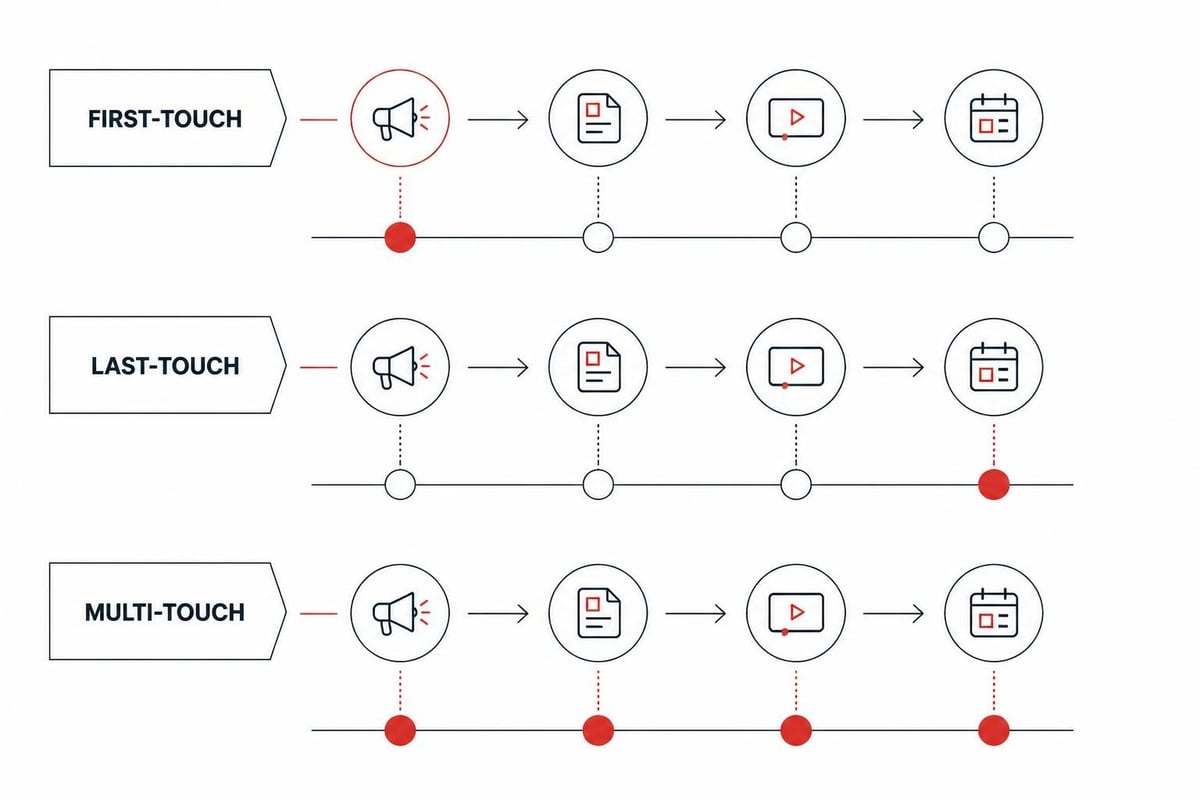
Attribution reveals which marketing efforts generate pipeline and revenue. The most common models include:
- First-touch: Credits the initial source that brought the lead to you
- Last-touch: Credits the final interaction before conversion
- Multi-touch: Distributes credit across all touchpoints in the journey
- Time-decay: Gives more credit to recent interactions
For B2B with long sales cycles, multi-touch or time-decay models provide the most accurate picture. Track not just conversions but influenced pipeline-deals where a specific campaign or asset played a role even if it wasn't the first or last touch.
What Are Common Lead Tracking Mistakes That Kill Conversions?
The biggest mistake is tracking data you never use. Many B2B teams capture dozens of form fields and behavioral signals but never build workflows or reports that act on the information. This creates database bloat and slows down your systems without improving outcomes.
Over-Qualifying Too Early
Asking for company size, budget, timeline, and detailed pain points on the first form interaction kills conversion rates. Research from Unbounce shows that each additional form field reduces submission rates by approximately 5%. The solution is progressive profiling: capture minimal information upfront (usually just name and email), then enrich and qualify through subsequent interactions and data appends.
Ignoring Privacy and Compliance
Lead tracking must comply with GDPR, CCPA, and other privacy regulations. The ICO’s guidance on online tracking makes clear that legitimate interest alone doesn't justify all tracking activities-you need proper consent mechanisms and transparent data usage policies.
Common compliance failures include:
- Installing tracking pixels without cookie consent
- Sharing lead data with third-party vendors without explicit permission
- Failing to honor opt-out and data deletion requests
- Tracking behavior after a prospect unsubscribes from communications
Non-compliance risks fines, but it also erodes trust. Prospects who discover your tracking practices violate their expectations will never become customers.
Breaking the Lead Handoff
Even perfect data capture fails if leads don't reach sales at the right time. The critical failure points are:
Speed to contact: Responding within five minutes increases conversion 21x compared to waiting 30 minutes, according to research from InsideSales.com. Yet most B2B teams average 42 hours for first response. Automated routing and instant notifications are non-negotiable.
Context loss: When a sales rep contacts a lead without seeing what content they consumed, which pages they visited, or what problems they're trying to solve, the conversation starts cold. Your CRM should surface this context automatically so reps can personalize outreach.
Dead-end follow-up: Tracking leads beyond the first conversation matters just as much as capturing the initial conversion. If a prospect says "not right now" but your system has no mechanism to re-engage them in 90 days, you've wasted the acquisition cost.
How Does Lead Tracking Integrate with Modern B2B Sales Processes?
In 2026, effective lead tracking extends beyond CRM data entry to power automated qualification, intelligent routing, and AI-driven follow-up. The post-pandemic B2B buyer expects instant responses and relevant, personalized communication at every stage.
Automated Lead Qualification
Modern systems use behavioral and firmographic data to score and route leads without human intervention. When a prospect from a 50-person B2B SaaS company views your pricing page three times, downloads a case study, and watches a product demo video, that sequence should automatically trigger SQL status and immediate sales notification.
The alternative-having SDRs manually review every lead-creates delays and inconsistency. Automation ensures high-intent prospects get contacted while they're hot, and lower-intent leads flow into nurture sequences until they show stronger signals.
For B2B teams struggling with inconsistent lead quality, Aletto has developed a proven framework that books qualified sales calls without relying on traditional cold outreach. The system combines paid acquisition with AI-powered follow-up that tracks every prospect interaction and responds based on behavioral triggers, not arbitrary timelines. This approach has generated over 1,122 qualified calls in 11 months for B2B SaaS and service companies.
Real-Time Lead Routing
Geographic, vertical, or product-based routing ensures leads reach the rep most qualified to close them. Enterprise tracking platforms support sophisticated assignment rules:
- Round-robin distribution to balance workload
- Account-based routing that assigns all contacts from a target company to the same rep
- Territory assignment by region, industry, or company size
- Skill-based routing for specialized products or technical sales
The tracking component is critical: the system must capture enough data at conversion to make smart routing decisions instantly. According to Aletto’s work on SaaS demand generation, companies that route within 60 seconds of form submission see 3.5x higher contact rates than those averaging 30+ minutes.
AI-Powered Follow-Up Sequences
Modern lead tracking feeds AI systems that determine optimal follow-up timing, channel, and messaging. Instead of generic email sequences, these platforms analyze:
- Historical response patterns by segment and source
- Individual prospect engagement with previous messages
- Competitive signals like technology stack changes or hiring trends
- External triggers like funding announcements or leadership changes
The tracking infrastructure must capture these signals in real-time and make them available to the AI decisioning layer. This is how B2B teams are moving beyond batch-and-blast email campaigns to truly responsive, conversational follow-up.
Automated B2B lead tracking workflow showing form submission triggering instant enrichment, scoring evaluation, routing decision, and personalized AI follow-up based on source channel and behavioral profile
What Tools and Technologies Power Effective Lead Tracking?
The modern B2B lead tracking stack typically includes five core components: analytics and event tracking, CRM, marketing automation, enrichment services, and integration middleware.
Analytics and Event Tracking
Your analytics platform captures behavioral data before a prospect converts. Google Analytics 4 remains the standard for most B2B sites, tracking page views, session duration, and conversion events. Supplement with:
- Heatmapping tools (Hotjar, Crazy Egg) to understand on-page behavior
- Session recording to see exactly how prospects navigate your site
- Form analytics to identify drop-off points in multi-step conversions
The key is ensuring this behavioral data flows into your CRM. A prospect who visited your pricing page five times is fundamentally different from one who only read a blog post, and your tracking system must preserve that context.
CRM Platforms
The CRM is where lead tracking data lives and gets actioned. Top platforms for B2B include:
| Platform | Best For | Key Tracking Features |
|---|---|---|
| HubSpot | SMB and mid-market, inbound-focused | Native marketing automation, source tracking, deal pipelines |
| Salesforce | Enterprise, complex sales processes | Customizable objects, advanced reporting, AppExchange integrations |
| Pipedrive | Small teams, simple sales cycles | Visual pipelines, activity tracking, email integration |
| Close | Inside sales, high-volume outbound | Built-in calling, SMS, email tracking in one interface |
The right choice depends on deal complexity, team size, and existing tech stack. What matters most is using the platform consistently-CRM data is only valuable when it's complete and current.
Marketing Automation
Platforms like HubSpot, Marketo, and ActiveCampaign bridge the gap between initial lead capture and sales readiness. They track email engagement, score leads based on behavior, and nurture prospects through automated sequences. The critical integration is bidirectional sync with your CRM so marketing activity appears in sales workflows and sales status updates inform marketing segmentation.
Email tracking requires attention to deliverability. Litmus’s guidance on email deliverability explains how poor sender reputation undermines tracking accuracy-if your emails land in spam, open and click data becomes meaningless.
Data Enrichment Services
Form data is incomplete by design-you minimize fields to maximize conversions. Enrichment services like Clearbit, ZoomInfo, and Apollo fill the gaps by appending firmographic and technographic data. When someone submits an email address, enrichment instantly adds:
- Full company profile (size, industry, revenue, location)
- Technology stack and product usage
- Social media profiles and professional background
- Contact information for other decision-makers at the company
This transforms a minimal lead into a fully-qualified prospect record without requiring longer forms. Track enrichment success rates and accuracy-low match rates indicate you're targeting the wrong audience or need better data providers.
Integration and Automation Middleware
Tools like Zapier, Make, and Workato connect disparate systems so lead data flows automatically. Common workflows include:
- New Facebook lead ad submission → enrich via Clearbit → create CRM contact → send Slack notification to sales
- New demo request → check if existing customer → route to account manager vs. new business rep
- Lead reaches SQL status → create task for sales rep → send calendar link via SMS
These integrations eliminate manual data entry and ensure tracking happens in real-time. The tradeoff is complexity-each new integration point creates potential failure modes that require monitoring and maintenance.
How Do You Measure Lead Tracking Effectiveness?
Success metrics for lead tracking fall into three categories: data quality, process efficiency, and revenue impact. Track all three to ensure your system is both accurate and valuable.
Data Quality Metrics
- Completeness rate: Percentage of lead records with all required fields populated
- Accuracy score: How often enriched or manually-entered data proves correct when validated
- Duplication rate: Percentage of duplicate records created (should be near zero with proper deduplication)
- Time to enrich: How long between initial capture and full record enrichment
Poor data quality undermines every downstream process. If 40% of your leads have invalid email addresses or missing company data, your scoring and routing logic can't function properly.
Process Efficiency Metrics
- Speed to first contact: Time elapsed between lead creation and sales outreach
- Contact rate: Percentage of leads your team successfully reaches (phone, email, or meeting booked)
- Lead response time by source: Whether certain channels get prioritized (or neglected)
- Follow-up completion rate: How many leads receive the prescribed number of contact attempts
These metrics reveal bottlenecks in your tracking-to-action pipeline. If demo request leads get contacted in 10 minutes but content download leads wait 3 days, you're leaving money on the table.
Revenue Impact Metrics
- Conversion rate by source: Which channels generate leads that actually close
- Cost per SQL: Acquisition cost divided by sales-qualified leads, not just form fills
- Time to close by source: Whether certain lead sources have longer or shorter sales cycles
- Customer lifetime value by source: Which acquisition channels generate the most valuable long-term customers
Revenue metrics validate whether your tracking efforts translate to business results. You might discover that organic search leads convert at half the rate of paid search but have 3x higher lifetime value-a finding that should reshape budget allocation. More details on attribution and revenue tracking can be found in Aletto’s complete guide to SaaS lead generation tracking.
Frequently Asked Questions
What's the difference between lead tracking and lead management?
Lead tracking refers specifically to capturing and monitoring data about prospects-where they came from, what they've done, and how they've engaged. Lead management is the broader process that includes tracking plus scoring, routing, nurturing, and converting those prospects. Tracking is the data infrastructure; management is the operational workflow built on top of it.
How many touchpoints should I track before a lead converts?
Track every meaningful interaction, but prioritize first touch (initial source), key engagement milestones (pricing page visit, demo video watch, case study download), and last touch (final action before conversion). For B2B with 6-12 month sales cycles, prospects typically have 8-12 tracked touchpoints before closing, though only 3-4 usually carry significant attribution weight in most models.
Can I track leads without cookies or third-party tracking?
Yes, through first-party data collection and server-side tracking. Capture UTM parameters and source data when prospects submit forms, use authenticated sessions to track behavior for known contacts, and implement server-side Google Tag Manager to process data without client-side cookies. This approach respects privacy regulations while maintaining attribution visibility for your owned traffic and conversions.
What's the minimum viable lead tracking system for a startup?
Start with Google Analytics 4 for behavioral tracking, a CRM (HubSpot Free or Pipedrive) for contact management, and UTM parameters on all external links. Ensure every conversion point (demo request, trial signup, contact form) captures source data and creates a CRM record. You can add enrichment, scoring, and automation as volume scales, but source attribution and basic contact management are day-one requirements.
How often should lead tracking data be reviewed and cleaned?
Review tracking accuracy weekly during the first 90 days of implementation to catch configuration issues quickly. Once stable, monthly audits for data quality (duplicates, missing fields, invalid emails) and quarterly reviews of attribution models and conversion rates by source. Clean duplicates immediately when discovered, and deprecate unused custom fields annually to prevent database bloat and confusion.
Tracking leads systematically is what separates B2B teams that scale predictably from those that waste budget on broken attribution and missed follow-up. The companies winning in 2026 treat lead tracking as revenue infrastructure, not a marketing nice-to-have.
If you're ready to see how modern lead tracking combines with AI follow-up and automated booking to fill your calendar with qualified prospects, Aletto's Free AI Call Booking Report shows the exact system that generated 1,122 booked sales calls in 11 months-without cold emails, cold calls, or events. The report breaks down how paid acquisition, behavioral tracking, and AI-powered nurture work together to turn traffic into revenue. Download your free copy and discover how B2B SaaS and service teams are hitting their targets in the post-pandemic sales landscape.